> open source · sktime ecosystem
Agentic Forecaster for sktime
A drop-in sktime forecaster that uses an LLM-powered ReAct agent loop to automatically select and configure time series pipelines — from a plain English description of your data.
- Python
- sktime
- Claude API
- OpenAI
- Gemini
- FastMCP
- ReAct
Live Demo
Try It
Interactive demo running on Hugging Face Spaces. Enter a description of your time series and watch the agent reason through model selection in real time.
↗ Open in full screen at huggingface.co/spaces/kpal002/sktime-agentic-forecaster
Background
What is sktime?
sktime is a Python library for time series machine learning — think scikit-learn, but for sequential data. It provides a unified interface across forecasting, classification, regression, and transformation tasks. Every model follows the same fit() /predict() contract, making models composable in pipelines and ensembles.
The challenge: sktime has dozens of forecasters — ARIMA, ExponentialSmoothing, Prophet, Theta, TBATS, and more. Choosing the right one for your data requires expertise in time series analysis. Most practitioners just pick one arbitrarily or run a slow grid search.
This project asks: what if an LLM could reason about your data and pick the right model for you?
Architecture Overview
The Big Picture
From the outside, AgenticForecaster looks like any sktime model. You call .fit() with your time series and a natural language description of the data. Under the hood, an LLM agent takes over — reasoning through available models, fitting candidates, scoring them, and committing to the best one before returning control.
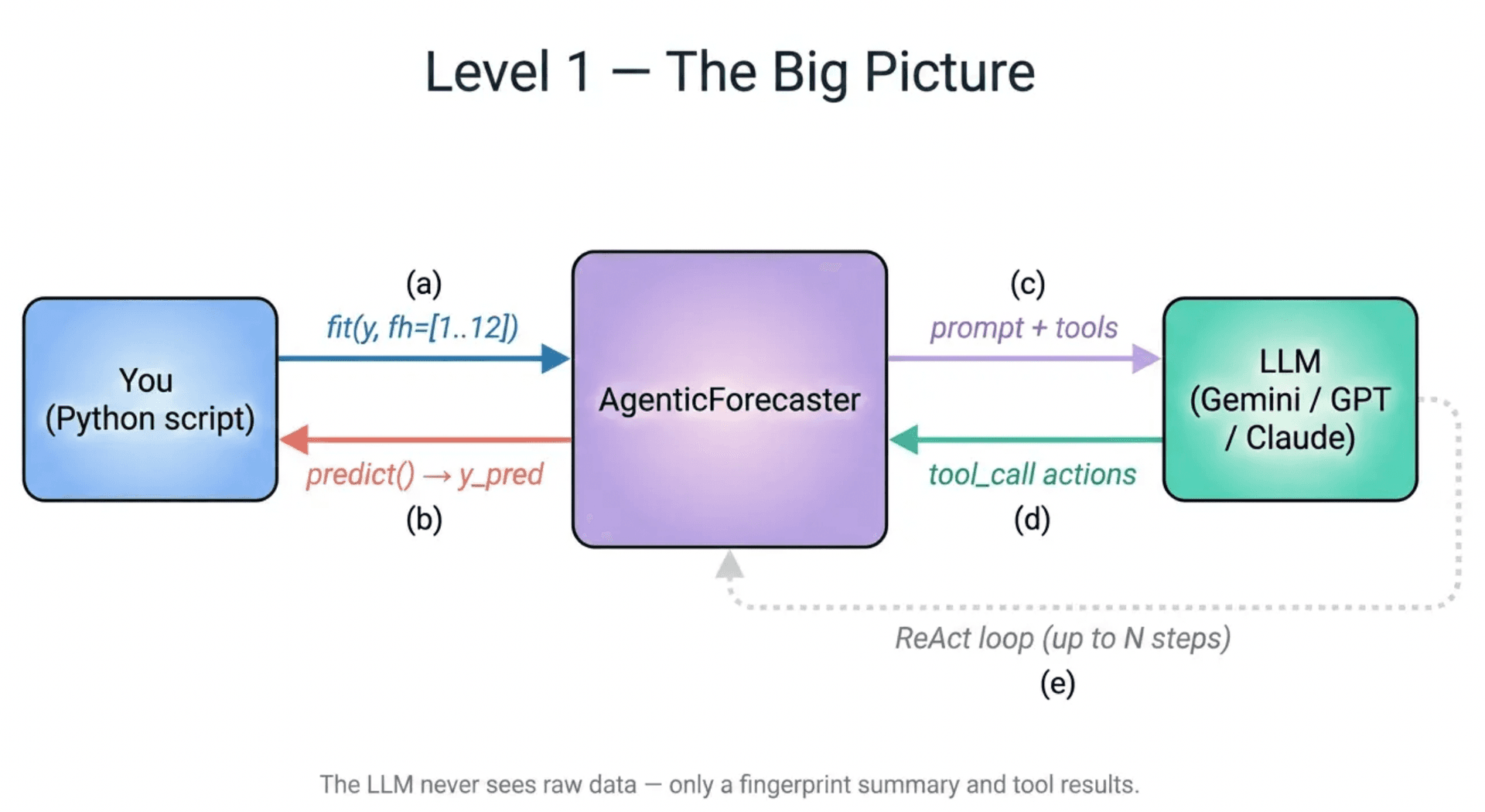
The key design constraint: the LLM never executes arbitrary code. It can only call a predefined set of six tools. This makes the system safe to deploy in a library context and keeps every decision auditable.
Design Principle
Constrained Tools, Not Free-Form Code
Most "LLM picks a model" demos work like this: prompt the model, get back a code snippet, run it with exec(). That isn't shippable in a library — you can't audit it, test it, or guarantee it won't import os and do something unexpected.
✗ Naive approach
- →LLM returns free-form Python code
- →Code is exec()'d at runtime
- →Unpredictable — can import anything
- →Untestable — can't mock deterministically
- →Not composable with sktime pipelines
✓ This approach
- →LLM calls only 6 predefined tools
- →Tools are auditable Python functions
- →Deterministic — mockable in CI
- →Every decision is logged in a transcript
- →Drop-in compatible with sktime
This is the same principle behind function calling in modern LLM APIs — instead of letting the model generate raw code, you give it a structured action space and let it reason within those constraints.
Tool Surface
The Six Tools
The agent has exactly six tools available during .fit(). Each tool maps to a concrete action: inspect the data, enumerate models, fit a candidate, score it, or commit. Nothing outside this surface can be called.
summarize_dataReturns a fingerprint of the time series: length, min/max/mean/std, missing values, detected seasonal period, and trend slope.
This is always the first tool called — the agent needs to understand the data before reasoning about models.
list_forecastersReturns available models from the YAML registry, with optional tag-based filtering (e.g. only seasonal models, only probabilistic).
The registry is configurable — you can add custom models or restrict the search space.
inspect_forecasterReturns tags, default parameters, and a one-line description for a named forecaster.
Used to check if a model supports the required features before committing to fitting it.
fit_candidateTrains a named forecaster on the in-sample portion of the data with specified hyperparameters.
Multiple candidates can be fitted and compared before committing to one.
scoreEvaluates a fitted candidate using MAPE, MAE, or RMSE on either a held-out window or expanding-window cross-validation.
Scoring results inform the agent's final decision — it uses these numbers to reason about which model to commit.
commitLocks in the chosen forecaster and parameters. Must be called exactly once — calling it triggers a final refit on the full dataset.
After commit, the AgenticForecaster is fully fitted and .predict() can be called.
Core Mechanism
The ReAct Loop
ReAct (Reasoning + Acting) is a prompting pattern introduced in a 2022 paper by Yao et al. The LLM alternates between a thought step — reasoning about what to do next — and an act step — calling a tool and observing the result. Each observation is appended to the message history, giving the model a growing context of everything it has tried so far.
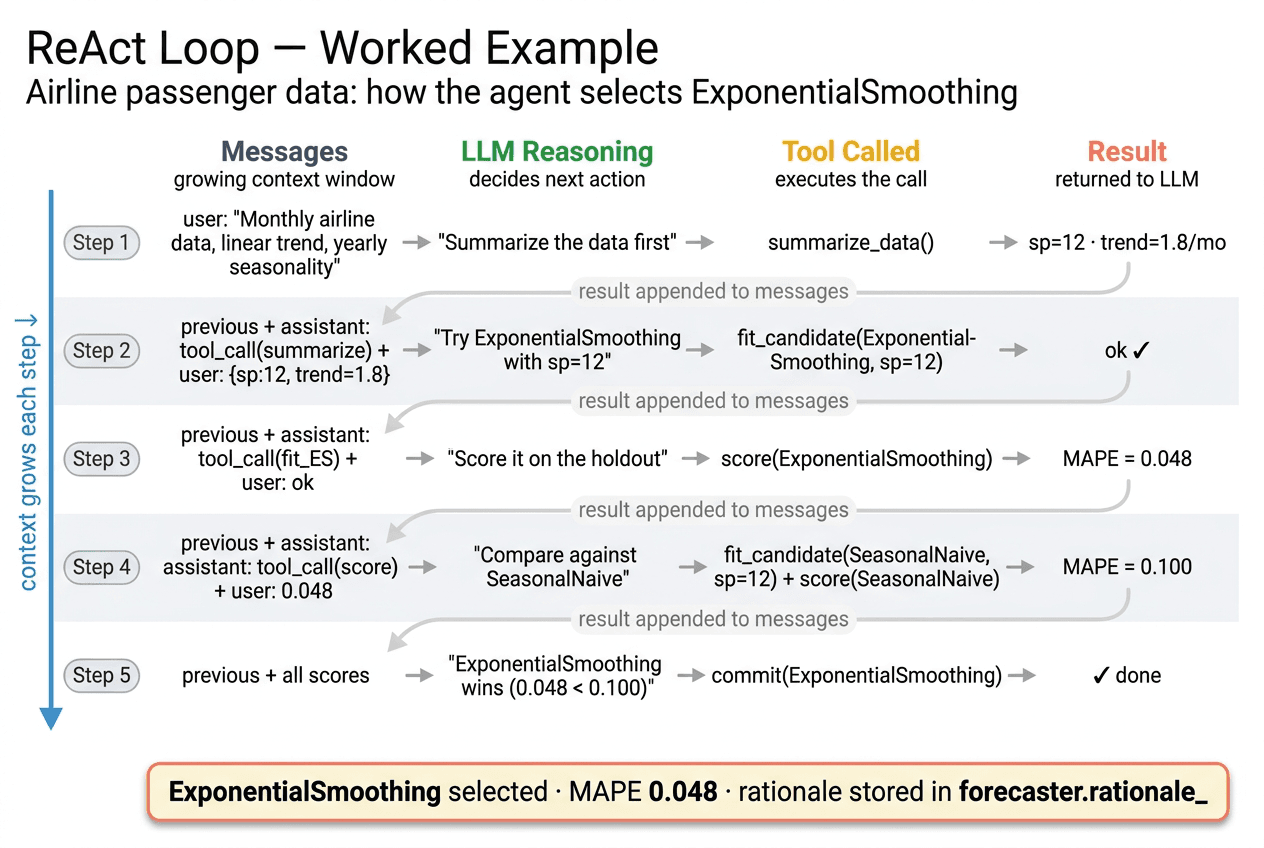
- →The LLM maintains a message history — each tool result becomes part of the context for the next step.
- →Max steps is configurable (default 12). If the limit approaches without a commit, the loop emits a warning and hints the agent toward its best candidates so far.
- →A three-tier fallback fires if steps exhaust: use highest-scored candidate → attempt quick scoring on fitted candidates → use any fitted candidate.
- →The full transcript (every tool call and response) is stored in forecaster.transcript_ for inspection.
Why ReAct?
There are several ways to get an LLM to select a forecasting model. Each makes different trade-offs. ReAct was chosen because model selection is an empirical task — the right answer depends on what the data actually looks like and how candidates actually score, not what an LLM thinks they might score.
One-shot prompting
Describe the data in a single prompt and ask the LLM to name the best model.
✓ Zero latency — one API call.
✗ The LLM guesses from a description. It never sees actual data statistics or real scores. A series described as 'seasonal' could have sp=4, sp=7, or sp=52 — the model can't tell without summarizing the data first.
Chain-of-Thought (CoT)
Ask the LLM to reason step-by-step before giving a final answer, all in one pass.
✓ Better than one-shot — the reasoning is visible.
✗ Still a single forward pass. The LLM reasons about hypothetical tool calls but never actually runs them. Scores and fit results are imagined, not observed.
Plan-and-Execute
LLM first writes a full plan (which models to try, in what order), then a separate executor runs it.
✓ The plan is auditable upfront.
✗ The plan is fixed before any data is seen. If step 2 of the plan fails or returns a surprising result, the executor can't adapt — it just continues the original plan.
ReAct loop ✓
LLM reasons and acts one step at a time, observing real results before deciding the next action.
✓ Adaptive — the agent adjusts based on what it actually observes. If ExponentialSmoothing scores poorly, it can pivot to a different class of model. Each decision is grounded in real data.
✗ Multiple API calls per fit() — higher latency and cost than single-pass approaches. Prompt caching (Anthropic ephemeral cache) mitigates this by 60–80% after the first step.
Known Limitations
- →Latency — a full fit() run with a real LLM backend takes several seconds. This is acceptable for offline model selection but rules out real-time use cases.
- →Loop instability — LLMs can get stuck calling the same tool repeatedly without committing. The max_steps cap and three-tier fallback are mitigations, not solutions. Better prompting or a fine-tuned model would help.
- →Context length — the message history grows with every step. On very long runs (many candidates, verbose tool results) the context can become expensive. Tool results are kept terse to limit this.
- →Non-determinism — two runs on the same data with the same prompt can select different models. Temperature=0 reduces this but doesn't eliminate it for all backends.
Execution Flow
What Happens During .fit()
Calling .fit(y, fh=h) triggers four distinct stages. The first three happen inside the ReAct loop; the last happens once the agent commits.
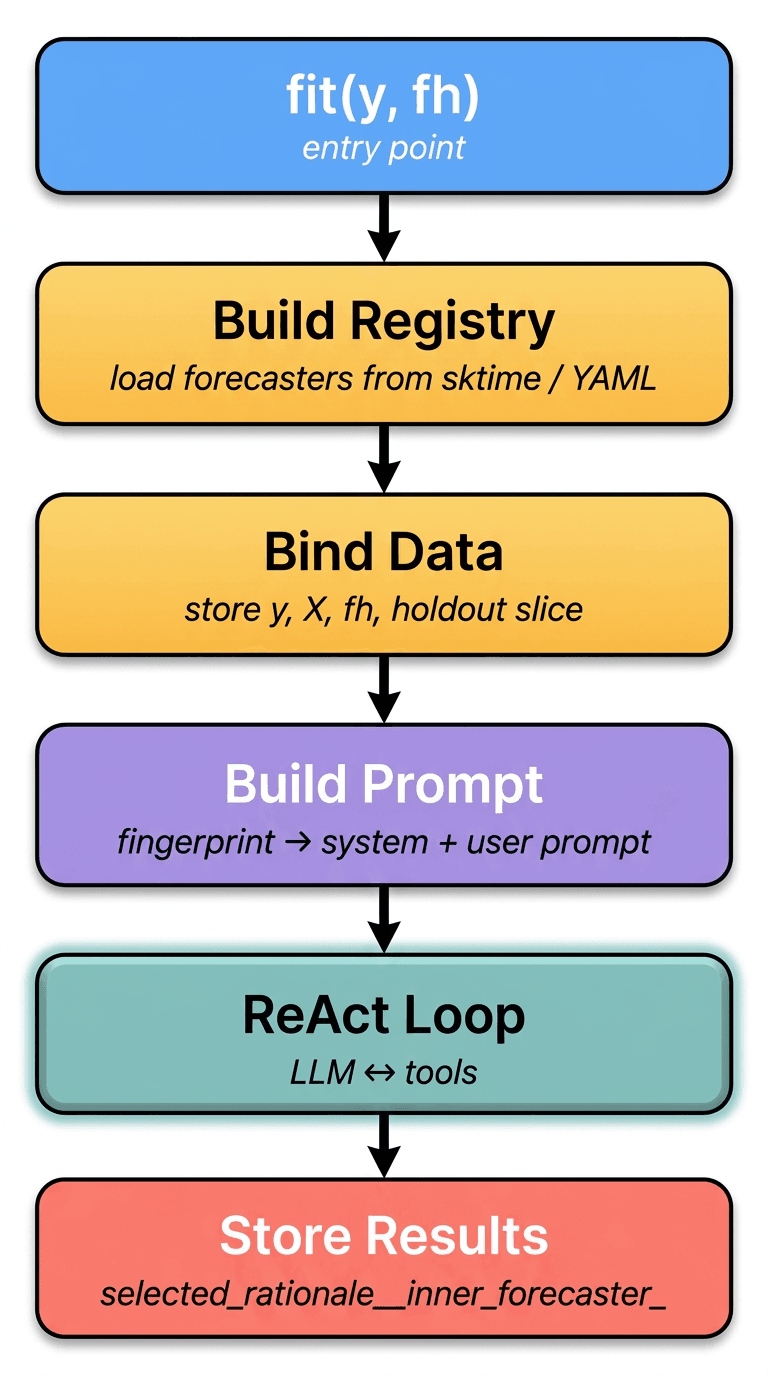
01
Data Summary
Agent calls summarize_data to get a statistical fingerprint of the series.
02
Enumerate
Agent calls list_forecasters to see what's available, optionally filtered by tags.
03
Evaluate
Agent fits and scores multiple candidates, comparing their held-out performance.
04
Commit + Refit
Agent calls commit(), which triggers a full refit on the complete dataset.
Deployment
Two Transport Modes
A transport is how tool calls get routed from the agent to the actual tool implementation. This is an architectural layer that most single-purpose scripts ignore — but a library that wants to work in multiple deployment contexts needs to make it explicit. The transport parameter controls which path is used without changing anything else about the agent's behavior.
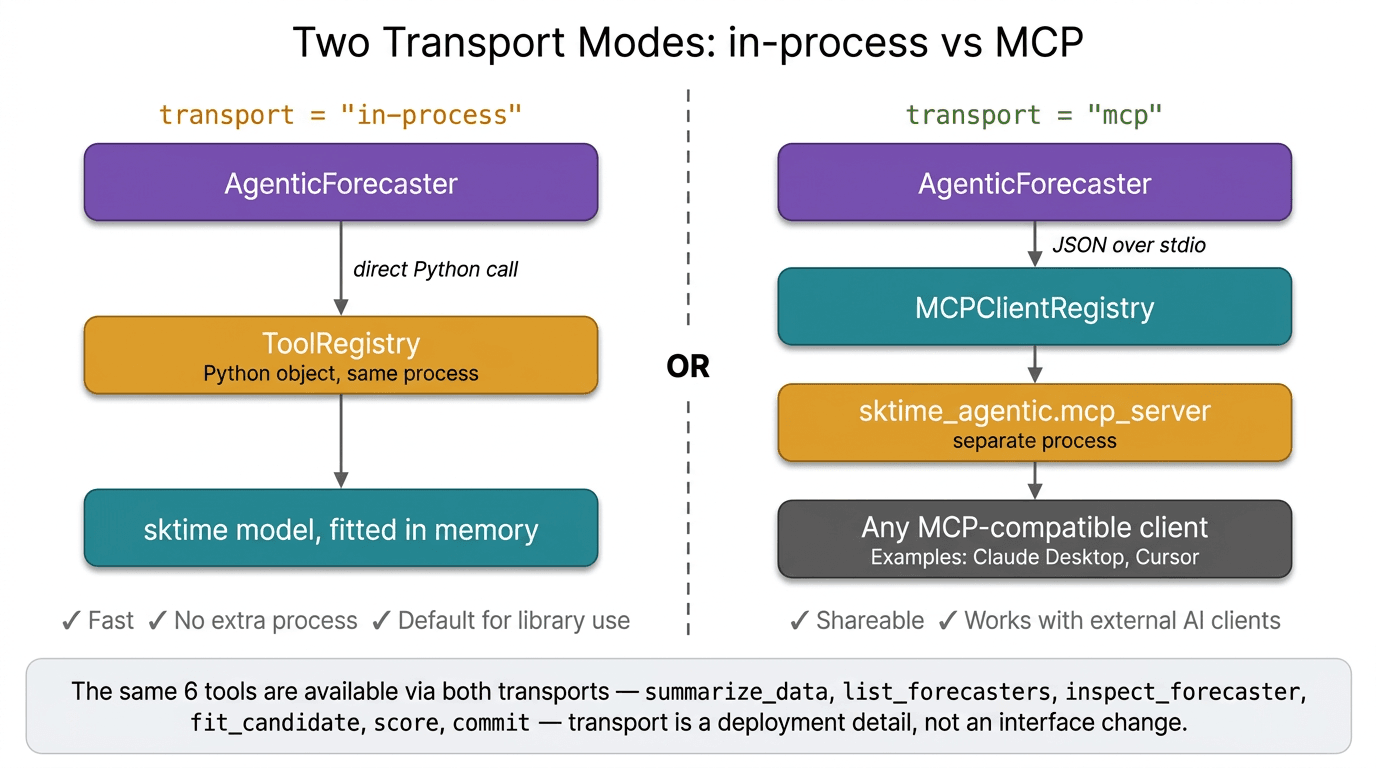
In-Process (default)
Tool calls are regular Python function calls in the same process. TheToolRegistry object holds the data and fitted candidates in memory — no serialization, no network.
forecaster = AgenticForecaster(
    prompt="Monthly data, yearly seasonality",
    transport="in-process",
)- →Zero setup — works anywhere Python runs
- →Fastest possible — no serialization overhead
- →State lives in memory alongside the forecaster
- →Default for library use and notebooks
MCP Mode
Tool calls are serialized as JSON and sent over stdio to a separatemcp_server process. The server exposes the same six tools over the MCP protocol.
forecaster = AgenticForecaster(
    prompt="Monthly data, yearly seasonality",
    transport="mcp",
)- →Tools run in an isolated process — crashes don't take down the caller
- →Any MCP client (Claude Desktop, Cursor) can use the tools directly
- →sktime becomes a shareable backend, not just a Python library
- →Slightly higher latency from JSON serialization + process boundary
What is MCP?
The Model Context Protocol (MCP) is an open standard introduced by Anthropic in 2024 for connecting AI models to external tools and data sources. Before MCP, every AI tool integration was bespoke — a plugin format for one app, a function schema for another, a REST API for a third. MCP standardizes the interface so any compliant client can talk to any compliant server without custom glue code.
Think of it as the USB-C of AI tool use. A sktime MCP server exposes forecasting tools; Claude Desktop, Cursor, or a custom agent can call them without knowing anything about sktime's internals.
Why These Two? Were There Other Options?
Yes — several alternatives were considered. The design goal was: support the standard library use case with zero overhead, and support external clients without a custom integration per client.
HTTP / REST API
Wrap tools behind a REST server. Client sends POST requests, server returns JSON.
✓ Language-agnostic — any HTTP client can call the tools.
✗ Requires a running server with a known port, auth, and network config. Overkill for a Python library. Adds operational burden with no benefit over MCP for the target use cases.
gRPC
Define a protobuf schema for tool calls, generate client/server stubs.
✓ Strongly typed, fast binary serialization, good for high-throughput services.
✗ Requires protobuf compilation step, heavy toolchain, and is completely incompatible with existing AI client ecosystems. No AI tool natively speaks gRPC.
Hardcoded function calls only
Skip the transport abstraction entirely — tools are always called as Python functions.
✓ Simplest possible implementation. No abstraction overhead.
✗ Locks the tool surface to Python in-process forever. External clients (Claude Desktop, Cursor) can never use sktime tools without a separate integration layer built from scratch.
In-process + MCP over stdio ✓
In-process for library use; MCP over stdio for external clients. Same tool surface, two dispatch paths behind a single transport= parameter.
✓ In-process covers 95% of library use cases with zero overhead. MCP over stdio is the emerging standard for AI tool interop — no server ports, no auth, no custom protocol. A single codebase serves both contexts.
✗ Two code paths to maintain. The MCP path adds a process boundary and JSON serialization overhead. stdio-based MCP isn't suitable for high-throughput or multi-client scenarios (an HTTP MCP transport exists for those cases but isn't implemented yet).
Known Limitations
- →stdio MCP is one-client-at-a-time — not suitable for serving multiple concurrent agents. An HTTP MCP transport would be needed for multi-tenant or server deployments.
- →State isolation in MCP mode — fitted candidates live in the server process, not the calling process. If the server crashes mid-fit, in-progress state is lost. In-process mode doesn't have this problem.
- →No remote MCP yet — the current MCP mode launches the server as a subprocess on the same machine. True remote deployment (server on a different host) requires the HTTP MCP transport, which is a planned extension.
Backends
Supported LLM Backends
The LLM client is swappable — the agent logic is the same regardless of which model powers it. This is important for cost management: you might use a cheaper model in development and a stronger one in production.
anthropicClaude (claude-sonnet-4-5 default). Supports prompt caching — reduces input token cost by 60-80% after the first ReAct step by caching the tool schema and system prompt.
openaiGPT-4o and compatible models. Uses OpenAI's function calling interface.
geminiGoogle Gemini 2.0 Flash. Lightweight option with fast response times.
mockDeterministic fake client. Runs predefined scenarios without any API calls. Used in CI and for offline demos.
Prompt Caching (Anthropic only)
The tool schema and system prompt are marked with cache_control: ephemeral. After the first ReAct step, Anthropic caches these tokens for 5 minutes — cutting the cost of subsequent steps by 60–80%. This matters because a full fit() run can involve 10+ LLM calls.
End-to-End
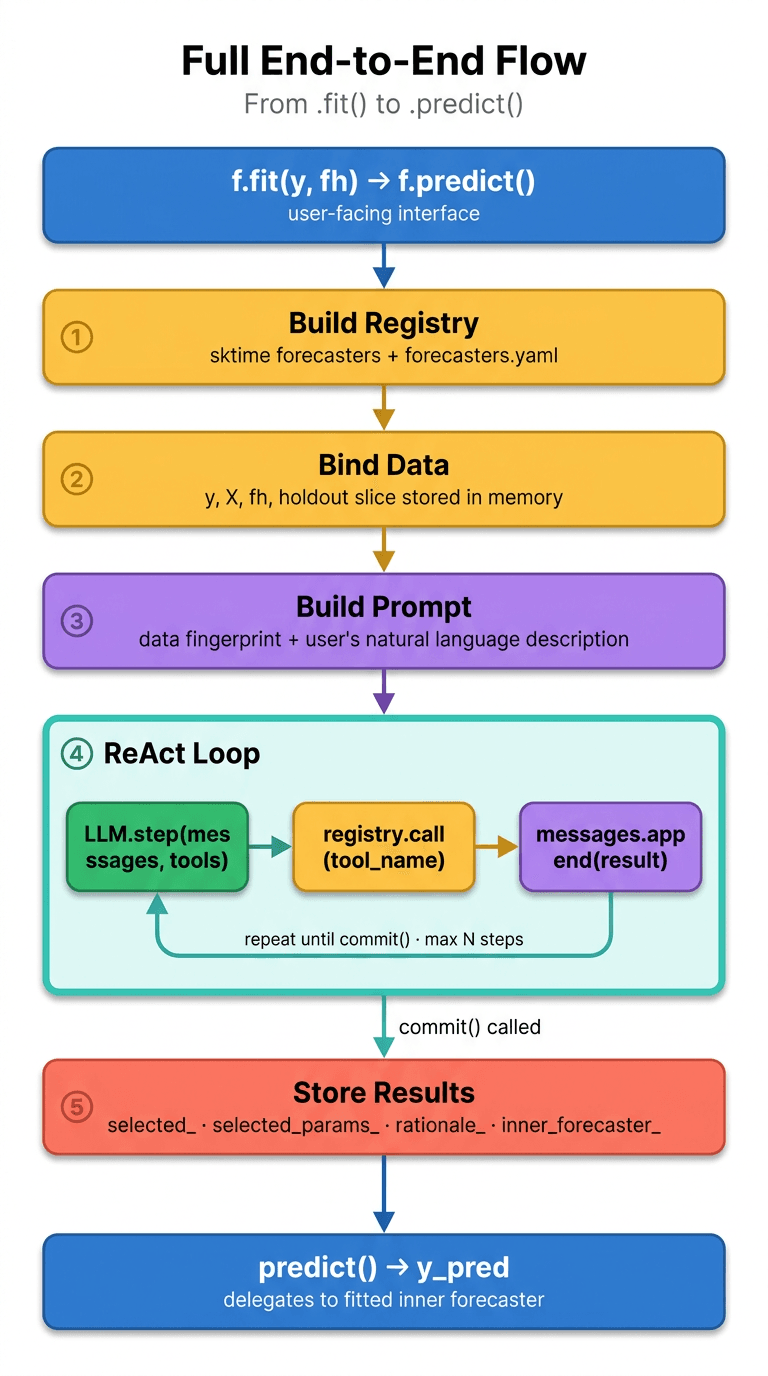
Full System Flow
Putting it all together — from the user's .fit() call to a fitted model ready for .predict().
Code Example
Using AgenticForecaster
The interface is intentionally identical to any other sktime forecaster. The only additions are the prompt parameter (your natural language data description) and the post-fit attributes that expose the agent's reasoning.
from sktime_agentic import AgenticForecaster
import pandas as pd

# Your time series — a standard pandas Series with a DatetimeIndex
y = load_your_data()

# Describe what you know about the data in plain English
forecaster = AgenticForecaster(
    prompt="Monthly passenger counts with linear trend and yearly seasonality.",
    backend="anthropic",   # "openai" | "gemini" | "mock"
    transport="in-process",
    holdout=12,            # months held out for candidate scoring
    metric="mape",         # "mae" | "rmse"
    max_steps=12,          # max ReAct iterations
)

# Standard sktime interface — nothing special here
forecaster.fit(y, fh=12)

# Inspect what the agent decided and why
print(forecaster.selected_)
# → "ExponentialSmoothing"

print(forecaster.selected_params_)
# → {"trend": "add", "seasonal": "add", "sp": 12}

print(forecaster.rationale_)
# → "The series shows a clear linear trend and strong yearly seasonality
#    (sp=12). ExponentialSmoothing with additive trend and seasonal
#    components achieved MAPE=4.2% on the holdout — better than
#    NaiveForecaster (11.3%) and AutoARIMA (5.8%)."

# Generate forecast — same as any other sktime forecaster
forecast = forecaster.predict()
print(forecast)
The rationale_ attribute is the agent's explanation in plain English — not a log dump, but the reasoning it used to justify its selection. This is stored alongside the full transcript_ (every tool call and response) for full auditability.
Design Decisions
Why These Choices?
Why YAML for the model registry?
A YAML registry means adding a new forecaster requires no Python code changes — you just add an entry. It also makes the registry inspectable by the LLM as plain text, which is important for the list_forecasters tool to work reliably.
Why held-out scoring instead of cross-validation by default?
Cross-validation is more statistically robust but much slower, especially for seasonal models that need to run many folds. Held-out scoring is fast enough for the agent's interactive loop. Expanding-window CV is available as an option for when accuracy matters more than speed.
Why store the transcript?
Reproducibility and debugging. If the agent makes a bad selection, you can inspect the exact sequence of tool calls and LLM reasoning that led to it. This is critical for a library — you need to be able to explain why a model was chosen.
Why a fallback strategy at max_steps?
LLMs can get stuck in loops — repeatedly calling the same tool without committing. The three-tier fallback (scored candidate → fitted candidate → any candidate) ensures fit() always completes, even if the agent doesn't behave ideally.
Why prompt caching with ephemeral TTL?
The tool schema is large (all six tool definitions). Without caching, it would be sent with every single ReAct step — potentially 10+ times per fit() call. Ephemeral cache (5 min TTL) covers a full fit() run and cuts input token cost by 60-80%.
Future Plans
Where This Is Going
The current prototype handles univariate selection with a fixed tool surface. Several natural extensions would make it production-ready.
Probabilistic Forecasting
Extend the tool surface to support prediction intervals and quantile forecasts — not just point predictions.
AgenticPipeline
Let the agent compose forecasters with pre-processing transformers (detrending, deseasonalizing, differencing) as a full pipeline, not just a single model.
Exogenous Variables
Support for covariates — the agent would need to reason about which external features are relevant and which models can use them.
Benchmarking Harness
Systematic comparison against AutoARIMA, ETS, and other AutoML baselines across standard datasets to measure when the agent adds value and when it doesn't.
Hyperparameter Search
Currently the agent picks parameters based on reasoning. A tighter loop where it proposes ranges and scores variants would improve accuracy on complex series.